Adobe blink first in Australia

Considerably greater Adobe Creative Cloud pricing in the UK is a big concern for a lot of my clients and my questions to Adobe about how they plan to increase subscription pricing in future has fell on deaf ears.

The Government in Australia have today managed to whip Adobe into action and lower the excessive pricing there by threatening “talks”, I’m hoping that (like the Irish food standards agency) this will prompt someone in the UK government to wake up and take similar action.

http://www.theinquirer.net/inquirer/news/2243268/adobe-cuts-its-creative-cloud-membership-prices-in-australia

Can a company continue to generate bad feeling among its customers and still survive?

I look forward to US pricing being available in the UK in the meantime I will advise clients on what is best for them and not what is best for Adobe.

Stephen


January update

TrueCall unit mounted under phone.
Its a spam filter for phone calls

Quick update for new clients and any clients phoning my landline number from a phone number other than their main ones.

I have installed a call screening device to get rid of of cold callers and international share sales / questionaire scams.

Its a brilliant device that allows through calls from known and trusted numbers but asks callers from unrecognised numbers their name before ringing the extension I use and asking if I want to take the call, if I do then I can add the number to my safe callers list using the star key.

Please bear with this process if you contact me on my landline, if Im in I will take your call (otherwise the answering machine will kick in). I will then add your number to the star list so any future calls come straight through.

Its been a real pleasure to answer the phone to genuine callers, the rest hang up or get blocked by the trucall device, I no longer get disturbed by criminals and time wasters as I retouch or write code.

if you like the sound of that you can learn more about the device here:
https://www.truecall.co.uk/home.aspx

The same company sell it on Amazon cheaper than their own site so buy here:
http://www.amazon.co.uk/TrueCall-The-Nuisance-Call-Blocker/dp/B002GP7HQM/ref=sr_1_1?ie=UTF8&qid=1357241376&sr=8-1

Stephen


Late December Update

Happy Christmas to all my clients!

Its been a very busy Autumn/Winter with new clients and projects undertaken. Updating the website has taken second priority but things here don’t stand still in the meantime!

I have been investing heavily in new equipment and software to better support the variety of work I do, some notable recent investments have been made, here is a rundown of whats been happening:

Hardware:


A new i1 Pro 2 Photo spectrometer with i1 Publish2 software, this joins my original i1 Pro which is now a backup. Print and monitor profiles are subtly better with the new equipment and Andrew Jackson at www.actpix.com has been very pleased with the profiles I built for his business, particularly the ones on new and esoteric print substrates.

Nikon D800e + lenses, up till now myself and my clients have mainly used Canon cameras as they had a lead over other makers in sensor design. They have now been overtaken by the Sony sensors in Nikon cameras and more people are switching over (sometimes back) to Nikon.

Knowing the handling and characteristics of modern Nikon bodies will help me advise and retouch images from these cameras, its a subtle thing but important.

As a long time Canon user a little thing such as the direction the lens is bayoneted on is proving interesting! If you have a large investment in Canon lenses then don’t despair, Canon have been working on improving their sensors and I hope 2013 will be the year they fight back.

I have built a new retouching PC with a third generation i7 processor and 32GB of ram, its a beast of a machine and makes bulk editing in Lightroom 4 possible (previously mass editing was done on Adobe Bridge because it was faster). It is cutting edge technology, most of the components are high performance and intended for overclocking, I don’t overclock however., I need speed *and* reliability to guarantee I can make client defined deadlines for important projects. My older PC though 20% slower than my new one is still much faster than most Photoshop PCs and means I have a backup ready to go at a moments notice.

My main monitor is still the outrageously expensive CG303 30″ colour graphics monitor that is profiling very well with the new photospectrometer.

Software:
I have been looking for something similar to www.tineye.com which can do a visual search for an image across the internet that can do a similar type search on a local LAN or filesystem. I think I may have found it with this: http://www.mindgems.com/products/VS-Duplicate-Image-Finder/VSDIF-About.htm
This software will help me better manage large collections for other people, I look after quite a few hundred thousand images for various clients and de-duplication within a collection is an important part of managing and preserving the integrity of the collection.

Photoshop 6 (13.0.1) and Lightroom 4 (4.3)  are now stable and very productive.

I have been looking into Adobe’s new Creative Cloud offering with clients in mind and raised a few concerns with the company.

As you may know for someone who only needs one or two programs from Adobe the Creative Cloud the pricing means you will be paying more to rent the software than periodic payments for updating your existing retail software (Particularly for European users).

My outstanding query is about Adobe’s policy for year on year subscription increases – will they be in line with inflation or are they about to turn up the price pressure? I’m not holding my breath as to when or if I get a reply but I will communicate it if I do.

I have already been informed that taking advantage of 12 months Creative Cloud at lower charge for existing users of the retail product does not terminate your retail product license – you can go back to your boxed software if Creative Cloud does not work out for you, which is good news and not as grasping as they could have made it. (I’m keeping a copy of that email 🙂

In the meantime I advise clients to upgrade their Photoshop to the latest retail release of version CS6 if they have not already done so, sit and wait it out until Adobe show their hand.

(Be aware that If you use the majority of programs in the Adobe Master collection (web,video,photography,design,print) then switching to the cloud makes sense)

Of course long term the solution is for other companies to provide a complete and compelling rival to Photoshop, if Adobe do milk their users there will be plenty of incentive to do so.

2013
Onward and upwards, I’m looking forward to further new clients with interesting and challenging projects they need support with as well as supporting existing clients who need help in making their businesses work. Investment in new technology allows me to offer a better service for us all.

Stephen


Update

You can tell when Im busy as I tend not to update the website! I recently expanded my retouching work here and in the spirit of the new age of premium work at less than premium costs I have been improving the infrastructure to allow me to move images to and from clients in a more timely manner, it all helps things pay for both myself and my client that a trip to the post office to post DVDs is no longer required. Im lucky enough to live in one of the few areas of Norfolk to be covered by the new Fibre  to the cabinet (FTTC) network by BT, I was first in line for the upgrade and my download speeds have now lept over 10x and upload speeds are now 16x faster than before. Any clients who are interested in moving images around quickly may want to check their line here if it mentions that your line supports fibre then check to see what your ISP has to offer.

(The figures mentioned in the image above are in megabits, just divide by 8 to get megabytes, 74mbits/sec is real world 9MB /sec download meaning a 60MB image download would take just over 6.6 seconds, uploading a 60MB image would take approx 30 seconds.)


Client Notice – Caution with new interface colours in Photoshop CS6

Click to enlarge

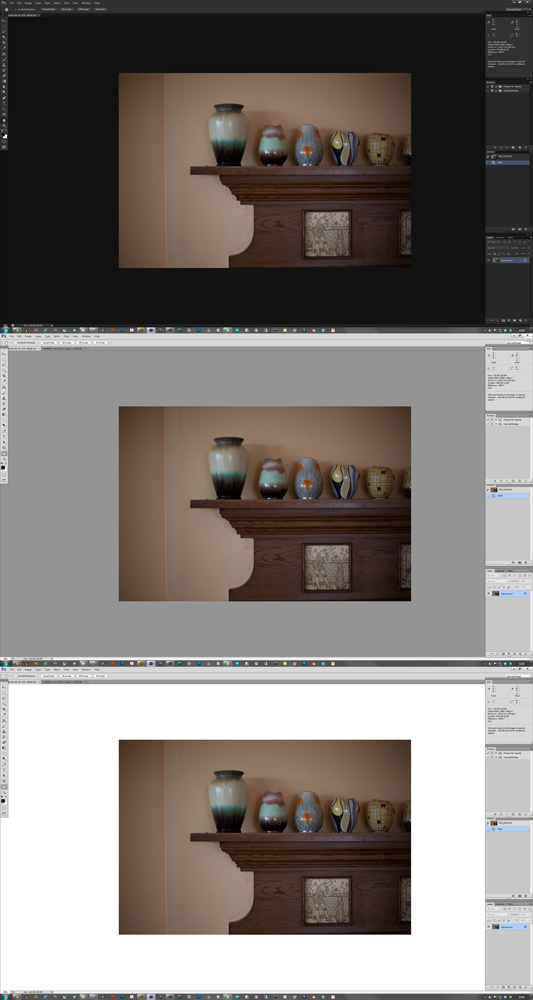
Which image on the left do you prefer?
Is it the bright one at the top which appears to have more contrast to either the middle or lower one?

As you may have guessed, all the images are exactly the same its just the surrounding interface colour that has changed. Its a known fact that the surroundings of an image can affect the perception of the image itself

Photoshop CS6 ships with the new darker interface colours as standard and as a result of this there will be lots of people disappointed with dark/flat prints from images worked on in CS6.

When preparing images from repro I regularly view each image against  light grey (default) but also against black then white.

Viewing an image against black is a quick way to visually check that shadow areas are not too light or too dark, viewing against white shows how the image will look when surrounded by white paper, this last step is critical in getting a perception as to how the image will look when printed.

I suggest you set Photoshop to default to the older light grey interface colour, I know its boring in comparison but your image adjustments will be easier to view.

To set the interface colour go to Preferences: Interface and select the lightest grey to the right.

If you want to judge shadows then press the F key to switch screen mode and right click on the grey area surrounding the image and select “Black”, to see the image against white press F again and this time select custom colour and choose white (top left hand corner of the colour picker), from now pressing the F key will cycle you through light grey / black / white. (Press the F key till you get back to light grey when your finished).

This tip is an example of the kind of practical Photoshop training I give to people who want to work to professional standards, its the kind of tip that is not in the manual but is important if you want to get things right. If you think you would benefit from some one to one training then give me a call.

Stephen


Photoshop CS6 retail code

I have just installed Photoshop CS6 from the retail release here at Copyrightimage.
Just a couple of points to help out any clients making the upgrade:

1. If you do have the beta of CS6 already installed then completely uninstall it first before installing the retail code. If you have Photoshop CS5 or earlier installed then dont uninstall it just yet.

2. There is one change since beta that annoys me – when using the zoom tool there are image measurements displayed at the edge of the zoom boundary box. This is very distracting to me, if you also find it annoying then you can turn it off by opening preferences and selecting “none” in the drop down menu of the   “Show Transformation Values” in the Options part of the Interface section.

I found the beta faster and nicer to use than Photoshop CS5 so Im hoping the retail code hasn’t changed this too much. If you are still using CS4 or earlier it may be time to think about swapping to a 64bit operating system and using CS6 in 64bit mode.

Any queries – get in touch,

Stephen


Lightroom 4 now available

Adobe have today released Lightroom 4 to market.
I have just ordered an upgrade copy on-line as I was pleased with the new functionality of the beta version.

The upgrade price (£59.09 inc VAT) is lower than previous versions and the retail price for the full product (£103.88 inc VAT) is also much less than previous versions. Adobe have reduced the price because of market competition from software such as Apple Aperture 3 which is priced at £54.99 for a new licence. A pity there is no competition for Photoshop.

You can read about Lightroom 4 here:
http://www.adobe.com/uk/products/photoshop-lightroom.html

If you decide to purchase I recommend requesting the box be sent to you, there is free shipping till the end of the month. The software download version costs more money and means no physical media to reinstall from, you will however be supporting the Irish Governments attempts to get the country back from the brink of economic collapse (the higher VAT rate Adobe charge for software downloads from Ireland are the reason for downloads costing more than shipping physical product). Its your call.


Windows 8 Preview

I have installed the public beta version of Windows 8 onto my main machine as a boot option in order to assess its suitability for my imaging clients.

First impressions are not good, the touch interface may work well on a tablet but as the default for a standard PC + monitor its hopeless.

The rest looks to be Windows 7 with some changes to the interface. It took me 5 minutes trying to find out how to restart the machine since all the usual desktop controls are not there any more and Microsoft are not giving the user any clues.

Clearly Microsoft wants Windows 8 to be hip but it ends up looking like an old fool, I just hope they can drag this one back from the edge as it currently looks like a slow motion car crash.

If your planning a system upgrade in the next 12 months then specify Windows 7 (preferably 64bit – give me a call if you have any queries.)

I will persevere with Windows 8 to check out Photoshop/Lightroom/Wacom/Xrite  interoperability but I’m not looking forward to it.

Stephen