Client Story: Hard Rain Project

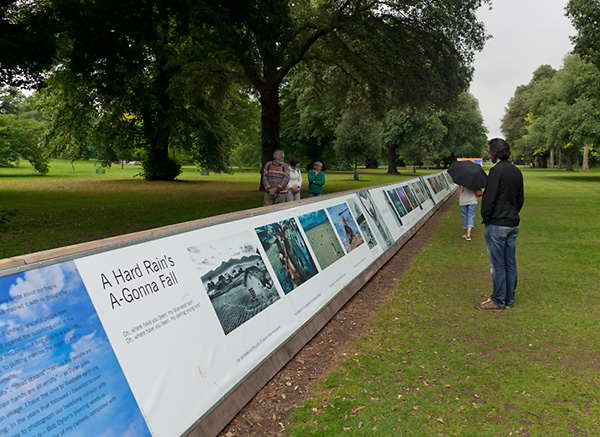
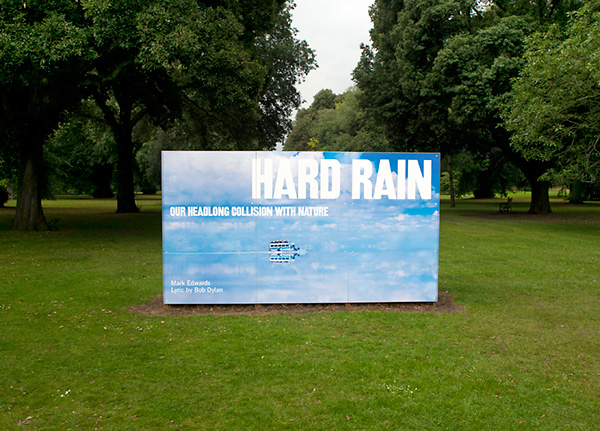
HARD RAIN: What’ll You Do Now?
at the Royal Botanic Gardens, Kew till 25th September 2011

Mark Edwards has used his original Hard Rain Project set of images as the core element of a new project that considers how we can as individuals and as a society can move towards a sustainable future for the Planet.

This powerful exhibition is currently on show at Kew Gardens in London, you can read all about the project and the exhibition here:
http://www.hardrainproject.com/

Kudos to the management of Kew Gardens for allowing some “difficult” images amongst the beauty of the gardens,  in my opinion this raises their profile as a conservationist organisation  and the garden location is exactly the right place for thousands of people each day to consider the issues raised.

Photography is at its best when it combines passion with meaningful subject matter and this exhibition has plenty of both. I recommend you visit the site or exhibition as it travels the world.
My involvement
I have worked with Mark to help prepare the images for printing for both this outdoor exhibition as well as for the book and Audio Visual uses.

Careful colour grading and consideration of Marks preferences for tonality means that the exhibition has a consistency of vision in the printed results.

Image restoration was part of the work undertaken to allow for the enlargement of low resolution images to 1 meter or more, I was always careful to keep the veracity of the underlying image and keep the image pure whilst reducing noise, chromatic aberration and other artifacts that would have impeded the message or meaning of the image coming through.

If you are planning a book or exhibition and have material from multiple sources it will always pay you to have me look at the material and quote on preparing the files for greater clarity and consistency and give greater readability to the work.

Stephen


x-rite do the right thing for potential OSX Lion users

It looks like x-rite have decided to include support for their older hardware (such as the i1 display 2) in i1profiler software (specifically i1Basic) which is designed to run on  OSX 10.7 (Lion).

They have done this after an outcry from users and suppliers who have rightly pointed out to them that not supporting their recent hardware is not the behaviour of a company that cares about its users.

So all very positive, though according the the table in the following link there will be a “nominal” fee if you bought your i1 display 2 before 2011, lets hope they drop the fee and just do the right thing.

http://www.xrite.com/custom_page.aspx?PageID=264

September is still some way off so don’t update to Lion till they release this, – a calibrated screen is far more important than sliding icons and App store jiggery pokery.

Stephen


Higher capacity Image Storage from Synology

For people who need greater digital image storage capacity than the current affordable 10.9TB Thecus then you may want to have a look at the following solution:

http://www.storagereview.com/synology_targets_photographers_new_ds2411_nas

I would estimate that filled with 3TB drives this should provide between 24-30TB of usable Raid 5 space (36TB unformatted). To put this in perspective thats enough for over  1/2 million uncompressed A3+ Tiffs or over 1 million camera raw images.

Synology have a good reputation for building solid kit so this look like a viable way to accommodate image collections. The 165mb/sec writing and 195mb/sec reading in raid 5 mode means that access to images is not going to be a problem.

As always – this is not a backup solution in itself, copies of all files must exist in some form as the device is a single point of failure (theft etc). What it does provide is fast and simple access to a large image collection.


Alert:Windows ATI Radeon 4870 video card / CS5 / CMYK / Problem

A bit of an obscure one this as I know clients with the above graphics card either don’t use Photoshop CS5 or never work in CMYK but I’m putting this information out there for people who may see the same problem.

With current and recent drivers switching screen mode in Photoshop (the F key) causes the display of a CMYK image to go saturated/incorrect.
I always advise clients the F key is a great way to view your images against black or white as well as the default grey surround. The display of the image against black allows you to spot weak / grey shadows and against white allows you to check highlight areas as they would print on paper.
Unfortunately with recent Windows ATI drivers and Photoshop CS5 *and* CMYK images the colours within the image distort in the different display modes. This does not happen with an RGB image!
Because I prepare images for rerpo I do need to have accurate CMYK previews so have invested in a Nvidea GTX 550Ti card with 2GB of memory, this card does not have the same problem and its extra memory is a real bonus when opening lots of images in Open GL mode. It also has the advantage that I can use the Graphics card processors (Cuda cores) to help calculate and apply noise suppression using the latest version of Neat Image noise reduction.
When I first started using Neat image it took up to 60 seconds to process an A3/300dpi image, now with the help of the new video card this is reduced to a few seconds.
Reading round the edges it would appear that Adobe engineers are using HP workstations with Nvidea graphics cards when developing Photoshop, the card I have bought is quite modest (approx £100) but is sufficient for Photoshop, clients using Adobe Premier will benefit from a faster Nvidea card that will aid real time video rendering.
All a little sad really as I was more than happy with my ATI card till now, but its more important that I can trust my screen and that’s why I made the change.
Stephen

i1 display 2 support under Lion

There wont be any.

Well that’s the short version. Since i1match software relies on the software transition layer called “Rosetta” to run on Intel Macs and “Rosetta” is dropped from OSX 10.7 (Lion) it is not possible to directly run the program on a machine running Lion without some very faffy workarounds.
The new i1Publish software does not support the older hardware but it does (surprise) support the new Xrite monitor calibrators they have just released.
Since there really is no compelling imaging reason to upgrade to Lion then I strongly advise that you don’t, you will save money and be able to easily calibrate your screen for a colour correct workflow.
However! at some point an upgrade will become important (newly released software/patches etc) that need Lion or one of its successors; I will therefore be testing out the new screen calibrators in the near future and report back.
In the meantime you can read some detail here from Rob Griffith with a very kind offer if you bought your i1 display 2 from them recently:
Xrite are not kind, they could easily have supported the older hardware on the new i1 software if they wanted to, its the kind of rough behaviour that comes from dominating the market by buying your biggest competitor (Gretag Mackbeth)….

OSX Lion

Because of the way the new Apple operating system will work there are problems with older legacy programs including colour management programs from xrite such as i1match many of you use to profile your screens.

Until I have tested work arounds and solutions I don’t recommend that clients upgrade to Lion just yet.
To be honest the upgrade looks to be less than compelling so you wont be missing much in the meantime.
Stephen

Advice: 2.0.9 Firmware update for Canon 5D Mk II

Canon have just released this update which when applied to the camera will improve performance with UDMA 7 type cards. There are other bug fixes too so its worth doing.

You can download the new firmware from here:
(select the firmware button then click on either the OSX or Windows link that shows up)
Be sure to follow the advice given to the letter to install this, if in doubt add it to the list of items to do when I’m next onsite with you.
Stephen

Thecus N7700 Pro for Image Storage

I have used many NAS (network attached storage) devices over the years but I’m very pleased with the latest one to join the network here at Copyrightimage.Like many of my clients I have a need to keep an archive of many thousands of images available for instant use and access. The major differences between this device and the more usual NAS devices are speed and capacity.

The N7700 Pro I have here is fitted with 7 x 2TB hard disks in RAID 5 formation which gives a single volume of 10.9TB of disk space, this means that I can hold large collections of images in one place which aids indexing and workflow.
The speed comes from its dual core processor which drives the controller and gigabit Ethernet to its full speed and so I can get real world transfer figures of 65mb/sec writes and even faster reads. This is over twice the speed of a USB2 drive connected directly to a host computer so its very impressive.

When dealing with large amounts of high res images this device would seem to be able to delivery speedy storage with the safety net of RAID 5 which means that if a disk fails I just need to swap it out for a new one (the image above shows the access door closed (left) and open (right) each disk is in a separate caddy.

The power supply to the device is a single point of failure however so its important I have at least one copy of every file on the device backed up somewhere else, as always, redundancy is the safety net.