Adobe Bridge Update 1.0.4

If you have Bridge 1.0.3 installed you may wish to run it and select updates… from the Help menu so that you can select 1.0.4 to download.
This update promises faster performance and improved security and should be downloaded.

There are versions for the mac and pc. If you have a version of Bridge earlier than 1.0.3 then you will need to download 1.0.3 before updating it.

You can download updates for Bridge and Photoshop here, Adobe have “improved” the site which as far as I can see makes it slower and less easy to use than their old design, if it aint broke….

Stephen


Photoshop Update 9.0.1

Adobe have released an update to Photoshop CS2 that fixes a few niggles and improves performance in certain conditions.
You can read all about it on the download pages:

Here for the Mac users
Here for the PC users

It seems a long standing tradition to bring out a 0.0.1 release for Photoshop, this one took longer than other revisions in the past. I have respect for Adobes programming skills so dont see any problems for clients updating their systems with this, it may even solve a few issues you may have.

oops… looks like I spoke too soon:

UPDATE: Adobe forums mention problems for Mac users when printing using 9.0.1 There is a problem with this update and colour management. Looks like a revised update will be coming soon. Will keep you informed.

Stephen


More memory = faster Photoshop

I recently spent just over £120 to upgrade my main retouching workstation from 2GB of memory to 4GB. Photoshop running on Windows XP can only use 2GB of memory directly (see below) but the remaining ram can and is used by the operating system as a cache for disk writes.

I did try turning some of the system ram into a virtual disk in order to set it as a Photoshop scratch disk but got identical timings to when I just left the operating system to manage the memory.

Photoshop is faster now when handling large files, filters such as lens blur appear much quicker than before. Worth the money spent.

There is an option when running XP to set a special /3GB switch in the boot.ini that enables windows to allocate 3GB of ram for applications. I managed to get this working (you need to add a command line switch to account for the memory allocation of your video card). However I found that my timings were not as good as the timmings I acheived before using the switch so I abbandoned it.


Improved Camera Raw for Photoshop

Version 3.3 of Adobe Camera Raw has been released with support for more cameras (including the Nikon d200). It also features improvments in other areas including display speed and image detail so I would ask everyone to spend the time getting the plug in and installing it.

You can read more about it here (also talks you through the install):

Adobe ReadMe.pdf

Download ACR 3.3 for the Mac

Download ACR 3.3 for the PC


Advisory – Adobe Bridge

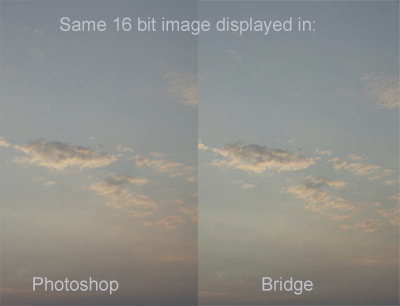
I have noticed that Adobe Bridge displays images with a different colour balance than Photoshop CS2. Furthermore if the files are 16bit in depth the problem is worse and there is posterisation and colour artefacts present in the Bridge thumbnnails on some images.

This appears to be a display problem with Bridge (possibly a trade off to increase speed?) I will look into the matter to see if there is a fix.

In the meantime be careful of making colour judgments of images using Bridge, check colour by opening them in Photoshop.

This behaviour has been noticed on both Windows and Mac platforms

UPDATE
I have come across other references to this problem in the Adobe forum but have seen no feedback from the engineering team, perhaps they are busy with Lightroom…


New raw workflow program from Adobe

Adobe have pre anounced a new program (still in beta) that they hope will take the wind out of Apple Apeture sales. Its called Adobe Lightroom and the free Mac beta can be downloaded from here:

http://labs.macromedia.com/technologies/lightroom/
(Short registration process to get it)
Adobe are reported to be working on a Windows version of the program.

more information on lightroom here:
Apple insider
Adobe Lightroom Forum

It looks like Adobe have decided to make a separate workflow / editing program for RAW files rather than bending bridge to fit. They describe this arrangement as being “modular” to Photoshop.

I will be checking out the beta this week once I have gone through some urgent client work.


Imacon Flextight 3f files and Adobe Bridge

Hasselblad have sent out a technical newsletter warning that Adobe Bridge can corrupt 3f files created using their Imacon scanning software.
They advise not using Bridge to manipulate 3f files, even giving an image a star rating could corrupt it. They are working with Adobe to fix the problem.
This information came from a client with a Flextight scanner, a nice piece of kit and this problem is in no way typical of Flextights quality standards.

Using the 3f file format is an option if you have lots of time and storage space to spare but is not necessarily the best workflow system to use for efficient production. Contact me if you would like to know more.

If you have information that would be useful for this site then please feel free to contact me on 01263 825277 or email me stephen@copyrightimage.com