Drobo, 1 week later

I have added a couple of 500GB drives to the existing pair of 750GB drives in my Drobo and now have 2.2TB of disk space (1.5TB after formatting).

Stability has been excellent with no problems reading and writing to the device. Write speed is approx 14.5mb/sec peak with reads being 18.5mb peak. (speeds reach their maximum when reading or writing large files – like repro sized images).

Obviously these speeds are lower than other USB2 attached drives (up to 50% lower) and I would imagine it is the processing overhead in data protection that is kicking in here. There is no point in wanting a firewire or other faster connection with the Drobo because I suspect its the built in processor that limits the speed.

Having said all that it is still 2x the speed of a consumer Buffalo Terastation with a 1000mbit Ethernet connection so its not too bad. The only other similar option would be a Thecus N5200 which is faster at approx 20-25mb/sec but costs a couple of hundred pounds more.

Im not too worried about transfer speed as my main use at the moment is backing up work via a script at night and even large jobs are backed up before morning. ( I use the Robocopy scripting program from Windows so technically I Robo to my Drobo…)

To put things in perspective here are the approx times to copy 1TB of data:

Bufallo Terastation 46 hours
Drobo 20 hours
Thecus N5200 13 hours
Single external USB2 disk 9.7 hours
Single internal disk 5.8 hours
Internal Raid-0 2.9 hoursOf course the fastest 3 options above would mean that you would lose your data if 1 disk were to fail whereas the other 3 options provide protection.If you currently use single external disks to keep single copies of valuable pictures then cancel anything else you planned today and start copying the files now.I have had too many clients lose images because they were on one external disk that failed.Best practice is to keep valuable images in at least 2 locations (drive + CD/DVD) extra safety comes from RAID5 or similar devices like the Drobo but you still need another physical copy just in case.Would you like my help with your storage requirements? would you like me to setup a series of automatic scripts to protect your day to day work? Get in touch now by emailing me Stephen@copyrightimage.co.uk
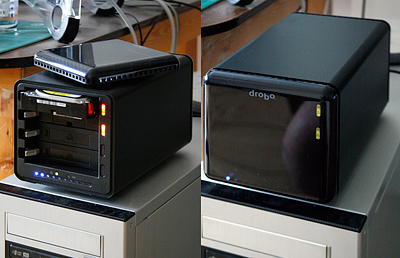

Data and image storage

I have just taken delivery of a drobo unit from http://www.vcisystems.co.uk/ the UK distributors for data robotics inc, you can read more about this unit here: http://www.drobo.com/

I need to test the unit thoroughly before I can recommend it to my photographers and photolibraires but early tests are quite positive, the company have developed a product that solves a common problem in data storage – keeping you work safe on disks that will at some random point in the future die.

As you may know I recommend RAID 5 based disks systems as a safe way to keep images long term and popular products include Buffalo terastations and Thecus NAS devices. The drobo is not RAID per se but rather implements its own data redundancy scheme to spread copies over more than one disk. System overhead is similar to RAID 5 with 4x500mb disks offering 1.5TB of space before formatting.

What makes this system interesting compared to NAS devices is its affordability and expansion potential. Another thing in its favour is the ability to hot swap disks in the device (take disks out or put them in while everything is still switched on and being used). This kind of functionality is normally reserved for system costing £10,000+

I will report back on my experiences when I have received a few more disks to populate the device with.

Stephen

What is NAS?


Monitor brightness with ATi video cards on a PC

Something strange happened a few days ago that I have now tracked down and corrected.
I use a ATi XTX1950X 512mb video card on my Vista workstation with the Catalyst control center software to configure it.

One day I noticed that my monitor didn’t look right and when I checked it read 85 candelas instead of 100. I re calibrated but 2 sets of calibration software couldn’t achieve a brightness level higher than 85. This is the kind of behaviour to expect from a 5 year old CRT monitor and not a CG211 LCD panel less than one year old.

When I attached my Mac to the screen however I found the brightness back to expected levels so it wasn’t the screen.

I knew therefore it was the PC setup at fault and proceeded to check everything, including uninstalling and reinstalling the ATI drivers and Catalyst program.

Eventually I traced the problem to an obscure setting in the color panel of the Catalyst control center. It was set on “PC standard black and white levels” which sounds fine to me but when I changed it to “Microsoft MCE black and white levels” I got my display brightness back. I have no recollection of even seeing this setting before so I’m unclear as to how the change happened.

I’m mentioning it here so anyone else who comes across this problem knows how to fix it. I seem to get a lot of hits from Google searches from people with imaging related problems, nice to know I’m helping!

Stephen


Camera Raw 4.1

Having already described the hard headed business types at Adobe and their desire to be as popular as the convicted monopolist Microsoft with their lousy pricing policy, it would appear that the good guys at Adobe have come to their rescue and put something in Photoshop CS3 that makes the upgrade worthwhile.

Camera raw 4.1 includes some very useful new tools:

Hue/Saturation/luminance tab which allows these adjustments with full access to the raw data. This results in much smoother tones and colours than if you perform the same operations on the image in Photoshop. For people who like to get their colour ‘just so’ this is a real improvement.

Defringe control (in the lens corrections tab) This is a great way to get rid of the colour fringing caused by affordable lenses (cheap ones). Its a one step control that doesn’t need picture-picture tweaking like the chromatic aberration sliders (though I still recommend their use – especially on wide angle shots that show it the most.)

Clarity control, this improves the contrast in the mid tones and can work very well.

All in all I’m finding the images I’m getting from recent raw conversions to be quite a bit better than the conversions in the past. It means less work in Photoshop and that’s got to be a good thing for your sanity and workflow.

The other lesson is that new technology and software algorithms improve over time and that’s a compelling argument never to delete RAW files, even the marginal ones.

If you upgrade to CS3 you will need to download ACR 4. from here:

Mac Windows

Im available for telephone/remote desktop and email support for training in the transition to CS3 for existing clients. New clients can email me in the first instance to arrange a workshop or onsite visit.

Stephen


Investments

In light of upcoming workshops I have been investing some cash in new licenses and equipment. I can now offer basic and advanced Photoshop CS3 classes using a new dual core 2 Intel based Mac system as well as the custom built Windows Vista workstation.

I have also bought in an Image Pro 5000 Just Normlicht viewing station for better proof viewing for the benefit of my retouching and publishing customers.


Good deals

DVD and CD storage
I recommend that you keep your separate image backups on different media and one of the choices is DVD or CD. Follow the recommendations of the manufacturers and keep your disks in the dark and away from extremes of temperature and moisture. I use aluminium cases, scroll down to the bottom of this link to see a good case (more on page 2). Keep the silica gel packet in the bottom of the case. Click here

The only calibrator most photographers need is a screen calibrator. Gretag Macbeth make good products and Dabs are selling their i1 display 2 repackaged under the Pantone name at a very good VAT inclusive price of £139.00. Here

I have no associations with either retailer so if you find the products elsewhere cheaper let me know and I will post a link.

Stephen


Smoother zooming and scrolling in Photoshop

If you have at least 1GB or ram on your machine you may want to consider enabling the Bigger Tiles plugin.

I have found that by enabling this moving the image around the screen is much smoother and easier on the eyes. To enable the plugin go to where you have installed Photoshop on your system then navigate to:

Plug-InsAdobe Photoshop OnlyExtensionsBigger Tiles

In the Bigger Tiles folder remove the ~ character from Bigger Tiles.8BX and restart Photoshop.
(Just put the ~ back if you want to revert back)

Stephen


Managing multiple monitor profiles in Windows XP and Vista

If you have a Gretag Macbeth product registered with the company then you can obtain a useful utilitiy:

DisplayProfile freeware for Windows

DisplayProfile allows you to store multiple monitor profiles for your PC and have a way to easily switch between them. By moving the window to any connected monitor you can dynamically update the profile for that monitor. You can download the software here: http://gretagmacbeth.com/getfile?send=1&id=8712 (requires login)

This is a useful utility to have whilst we wait for Gretag Macbeth to release a calibration loader that works fully with Vista, possibly in the next release of i1Match. I will inform you here just as soon as I know….

Stephen